


New here? Read the first three sections and you know enough to play today. The rest covers groups, scoring and the settings that decide who wins. Looking for a specific answer instead? Try the FAQ.
1. The basics
Word! is a daily five-letter word puzzle. Everyone in the world gets the same word on the same date, and you have six attempts to find it.
Type a five-letter word and submit it. The tiles change colour to tell you how close you were, and you use that to narrow down the answer with your next guess. Solve it in as few guesses as you can — that is what your score is built from.
You need an internet connection to play. Your guesses are saved on our servers as you make them, which is what keeps scores honest between players: reinstalling the app won't give you a fresh attempt at today's word.
2. Editing a word
You can edit a single letter within a word before you submit it by tapping the letter and typing a substitute on the keyboard. For example, if you wanted to type HOUSE but accidentally typed GOUSE, simply tap the letter G tile and a dotted border appears, allowing you to replace that tile with another.
3. Reading the tiles
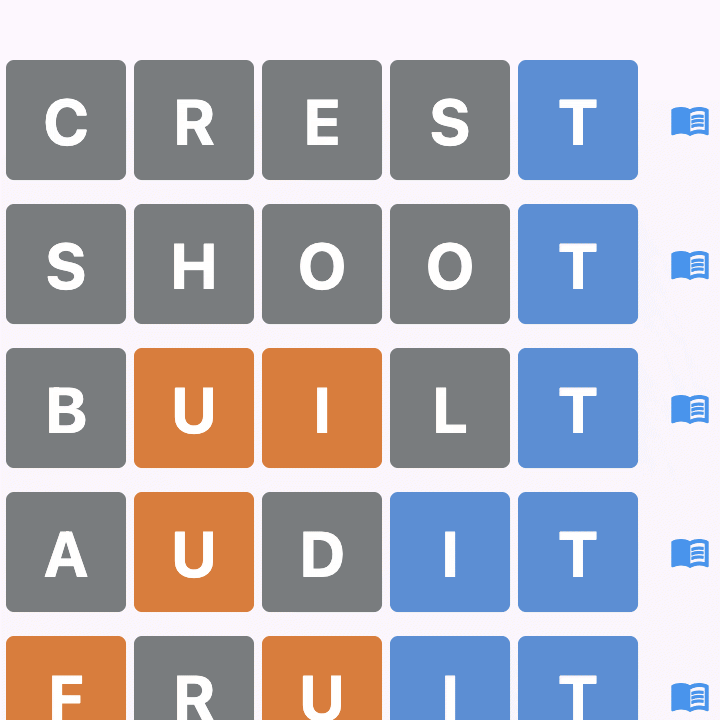
After each guess, every letter is marked one of three ways. In the default colour scheme:
- Blue — right letter, right position
- Yellow — the letter is in the word, but somewhere else
- Grey — the letter is not in the word at all
You are not restricted to those colours. Five schemes are available in your Profile — Default (yellow and blue), Red-Green Colourblind, Blue-Yellow Colourblind, High Contrast and Monochrome.
You can also switch on visual cues, which add border patterns so tiles can be told apart by shape as well as by colour. They are enabled automatically for the schemes that need them, and Monochrome relies on them entirely.
4. Scoring
Scoring is golf-style: the lower your total, the better. Solving the word in fewer guesses takes strokes off your score, and a failed puzzle adds to it.
| Guesses used | Name | Score |
|---|---|---|
| 1 | Hole in one | −3 |
| 2 | Eagle | −2 |
| 3 | Birdie | −1 |
| 4 | Par | 0 |
| 5 | Bogey | +1 |
| 6 | Double bogey | +2 |
| Not solved | Triple bogey | +3 |
A negative total is a good total. Four guesses is par — it neither helps nor hurts you.
Submitting a word to your group doesn't earn points directly. Instead, it sets a challenge for everyone else, so choose something that makes the game enjoyable, whether that's a clever curveball or a super tricky word.
5. Playing in a group
Groups allow you to compete with people you know. Tap the menu, create a group and invite players by email address. Whoever creates the group is admin for that group. There are a few rules you can tweak to suit your playing style including the days the game is played. If you're office colleagues, you might not want to compete on weekends, so make it Monday to Friday. If you're avoiding gaming during the week, make it Friday or Saturday–Sunday.
Each member gets to submit one word per day for others in the group to solve. On any given day you play the daily word plus whatever the other members have set. Create as many groups as you like to increase your play time.
- Submitted words need to be in the official word list to prevent profanity and non-dictionary words. We've done our utmost to keep the game family friendly but if you come across a word that you believe should not be in the official list, drop us a support email in the app and let us know
- One submission per person per day, based on your own local date
- Words expire after 24 hours, so there is no backlog to catch up on
- On a day the group isn't playing, submissions are closed
The daily word is free forever. Group play is a subscription feature, and every new account starts with a 30-day free trial.
6. Group settings that change your score
This is the part that catches people out. A group admin can change how a day is totalled, and the same performance can produce different scores in two different groups.
Active days. The group chooses which days of the week it plays. On a non-active day nothing counts at all — no games are counted as available, no penalty is applied, and custom words can't be submitted. A group that plays weekdays only simply doesn't score at weekends.
Best scores only. The admin can decide how rounds count towards the leaderboard each day. Example — if the admin sets a limit of three, only your top three results that day go towards your total, no matter how many you played. This makes it a bit more forgiving for those who might not have time to play more than three some days.
Penalty for unplayed games. If this is on, every game you were offered that day and didn't play adds +3 to your total — the same as failing it. Groups that want to reward turning up every day leave this on; casual groups turn it off so nobody is punished for a busy week.
Missing a day never breaks your streak, though. Only losing a game does that.
7. Leaderboards and statistics
Because scoring is golf-style, the lowest total wins. Every group has its own leaderboard covering today, this week, this month and all-time.
If two players finish level on points, we compare wins, then games played, then nickname alphabetically. Anyone who hasn't played yet sorts to the bottom rather than appearing to lead on zero.
There is also a global Daily Word leaderboard covering everyone who played that day's word, whether or not you share a group with them.
Statistics reset on a fixed schedule:
- Weekly — every Sunday at midnight UTC
- Monthly — on the 1st, at midnight UTC
- All-time — covers the current year and resets on 1 January
Your streak counts consecutive wins. It survives a skipped day and resets to zero only when you fail a puzzle.
8. Your account and your privacy
Your nickname on the global leaderboard is your choice. By default it is shown to all players. Switch it off in your Profile and everyone except you and players who share a group with you sees a shortened form instead, like "J***". Your rank and score appear either way.
Within groups, members always see each other's nicknames.
Notifications are opt-in and individually switchable: a daily reminder, plus alerts when someone submits a word to your group, when someone guesses your word, when others solve the daily word, and when you're invited to a group.
You can change your nickname or password, and delete your account and all its game data, from the Profile screen at any time. Full detail on what is stored is in the privacy policy.