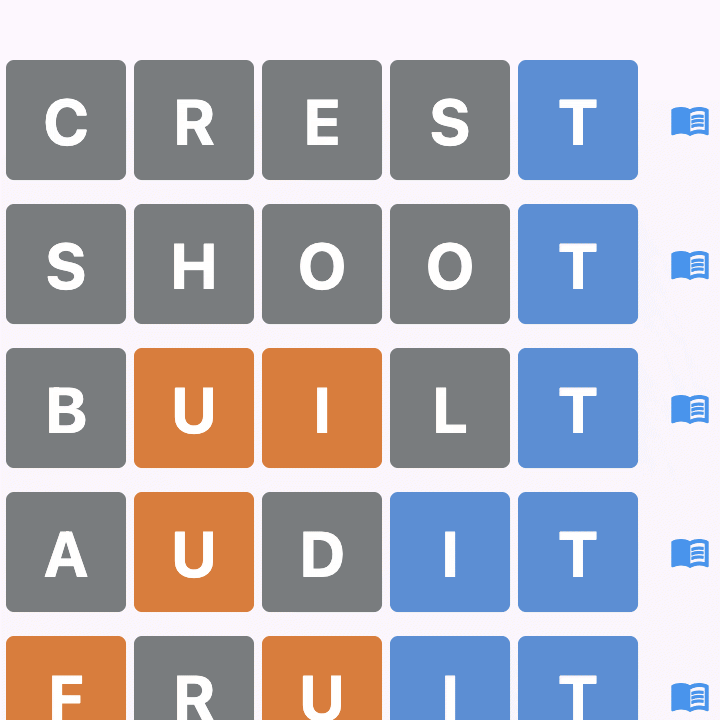
Everyone gets the same 5-letter word each day, and you have 6 attempts to find it. After each guess the tiles change colour to show how close you were. In the default colour scheme:
Blue - right letter, right position
Yellow - right letter, wrong position
Grey - the letter is not in the word
Can I change the tile colours?
Yes. There are five schemes to choose from in your Profile - Default (yellow and blue), Red-Green Colourblind, Blue-Yellow Colourblind, High Contrast and Monochrome - so the colours above are only the starting point. You can also switch on visual cues, which add border patterns so tiles can be told apart by shape as well as by colour. They are turned on automatically for the schemes that need them.
A game in progress in the Red-Green Colourblind scheme, where orange and blue replace the default yellow and blue.
Is Word! free?
The Daily Word is free - you can play it every day without subscribing. Playing in groups is a subscription feature, and every new account starts with a 30-day free trial so you can try it before deciding; the app shows how many days you have left. Monthly and yearly plans are available, along with bulk licences you can assign to family or friends.
How do groups work?
Groups let you play with friends and family. Create a group and invite people by email address, and each member can submit one custom 5-letter word a day for everyone else to solve. The group keeps its own leaderboard. Group admins choose which days of the week the group plays, and can switch on competitive scoring options.
How is scoring calculated?
Scoring is golf-style, so the lower your total, the better. Solving the word scores:
1 guess - hole in one, -3
2 guesses - eagle, -2
3 guesses - birdie, -1
4 guesses - par, 0
5 guesses - bogey, +1
6 guesses - double bogey, +2
Not solved - triple bogey, +3
Submitting a word to your group doesn't earn you points - it sets a challenge for everyone else rather than scoring for you.
Groups can also change how a day is totalled: counting only your best few scores each day, and adding +3 for a game you didn't play.
What happens if I miss a day?
Your streak is safe - only losing a game resets it, never skipping one. In a group it depends on that group's settings: if unplayed-game penalties are switched on, each game you didn't play adds +3 to that day's total. On days the group isn't playing, nothing is counted and no penalty applies.
What are streaks?
Streaks track how many games you've won in a row. Your streak continues as long as you keep winning games. If you lose a game, your streak resets to 0. Skipping a day doesn't break your streak—only losing does!
Can I submit any word to my group?
You can submit one 5-letter word per day to your group (in your local timezone). The word must be from our official word list to ensure it's a valid English word. Words expire after 24 hours, and submissions are closed on days the group isn't playing.
How do leaderboards work?
Because scoring is golf-style, the lowest total wins. Group leaderboards cover today, this week, this month and all-time. If two players tie on points we compare wins, then games played, then nickname alphabetically; anyone who hasn't played yet sorts to the bottom. There is also a global Daily Word leaderboard covering everyone who played that day's word.
When do statistics reset?
Weekly stats reset every Sunday at midnight UTC.
Monthly stats reset on the 1st of each month at midnight UTC.
All-time stats cover the current year and reset on 1 January.
Who can see my nickname?
Members of a group always see the nicknames of everyone in it. On the global Daily Word leaderboard your nickname is shown to all players by default, and you can turn that off in your Profile - after that everyone except you and the people in your groups sees it shortened, like "J***". Your rank and score appear either way.
Will the app remind me to play?
If you allow notifications, you can switch on a daily reminder, plus alerts for when someone submits a word to your group, when someone guesses your word, when others solve the daily word, and when you're invited to a group. Each one can be turned on or off separately in your Profile.
How do I change my nickname or password?
Go to the Profile screen (accessible from the menu). There you can update your nickname, change your password, or manage your account settings.
I forgot my password. What do I do?
On the login screen, tap "Forgot Password?" and enter your email address. We'll send you a verification code to reset your password. The code is valid for 30 minutes.
Can I play offline?
No - Word! needs an internet connection to play. The words, your progress and the leaderboards all live on our servers, which is also what keeps everyone's scores honest: your guesses are saved as you make them, so reinstalling the app won't hand you a fresh attempt at today's word.
How can I delete my account after sign up?
Your email address is never stored on our system - it is converted to a one-way hash when you sign up, which is why you need to provide it whenever we have to message you (registration, a forgotten password, and so on). The same applies to group invitations: the address is used to send the invitation and then discarded, and group admins see only the nicknames of the people they have invited.
You can delete your account and all game data at any time from the Profile screen on the in-app menu - there is a 'Delete Account' button at the bottom. Deleting your account removes your account and all associated game data.